Plan the week in one sitting.
One calendar for X, LinkedIn, Instagram, Facebook, TikTok and YouTube. Write it, pick a time, move on.
Free account, nothing to pay. Skool members log in with their Skool email. Skool member login
 PostSyncer
 Buffer
 Hootsuite
An illustration with sample words. Real screens of Post Scheduler HQ are further down.
Works with
- X
- TikTok
- YouTube
- Threads
- Bluesky
- Google Business Profile
- MCP
How it works
Up and running in three steps
 1
Sign up free and make your brand pack.
 2
Start it on your own server with one line. Claude Code can do it for you.
 3
Write or let AI write, pick the times, it posts everywhere.
A closer look
Everything in one place
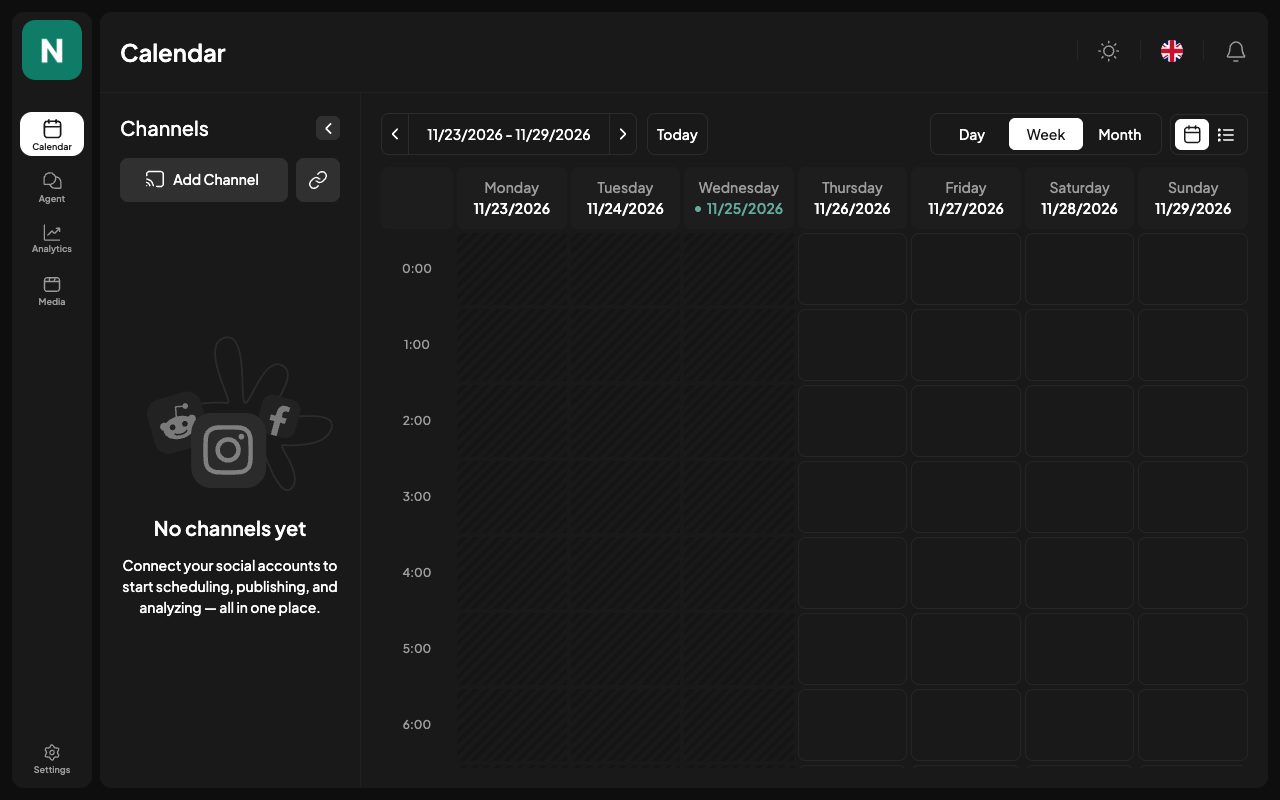
The whole week on one screen
Day, week or month. Every scheduled post sits on the calendar by channel, and you drag it to move it.
- Day, week and month
- Channels down the side
- Drag to reschedule
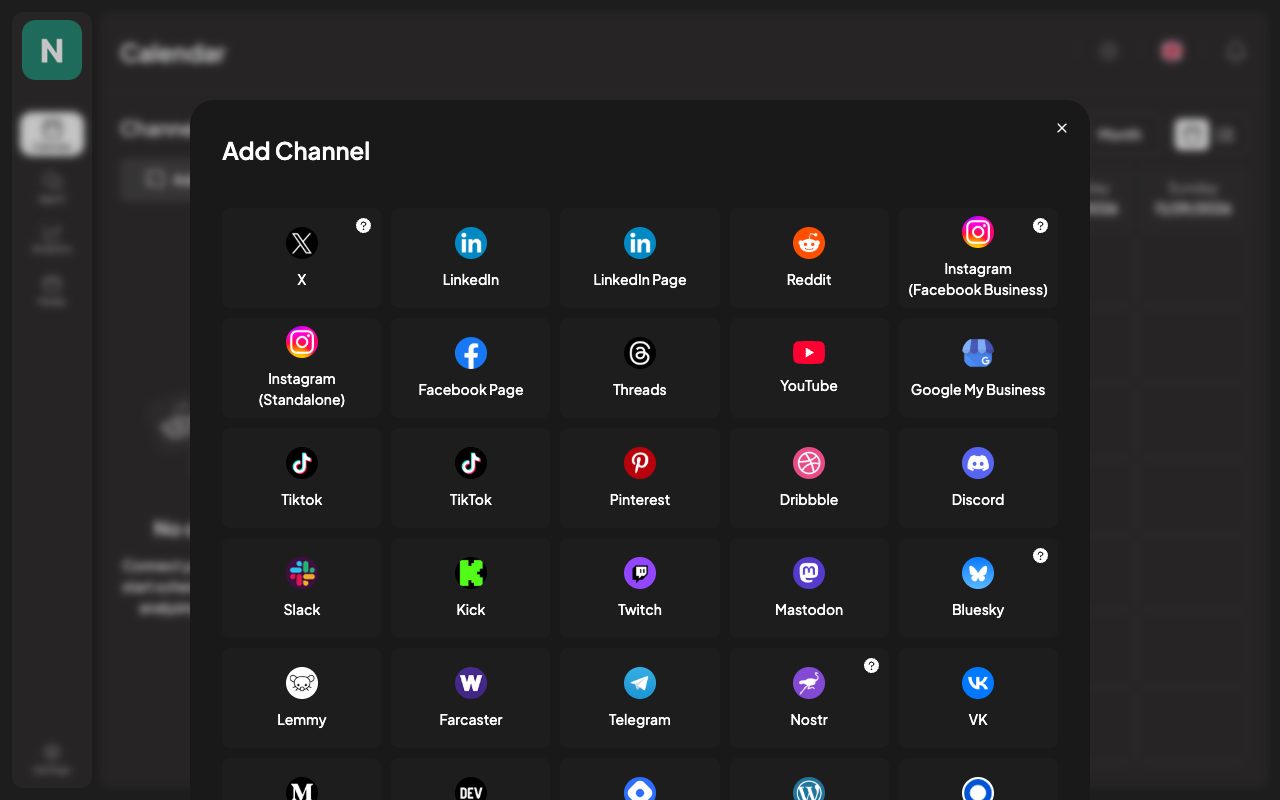
Connect the accounts you post to
More than 25 networks, from X and LinkedIn to Instagram, TikTok, YouTube, Bluesky and Google Business Profile.
- Personal and business accounts
- Several accounts per network
- Grouped by client
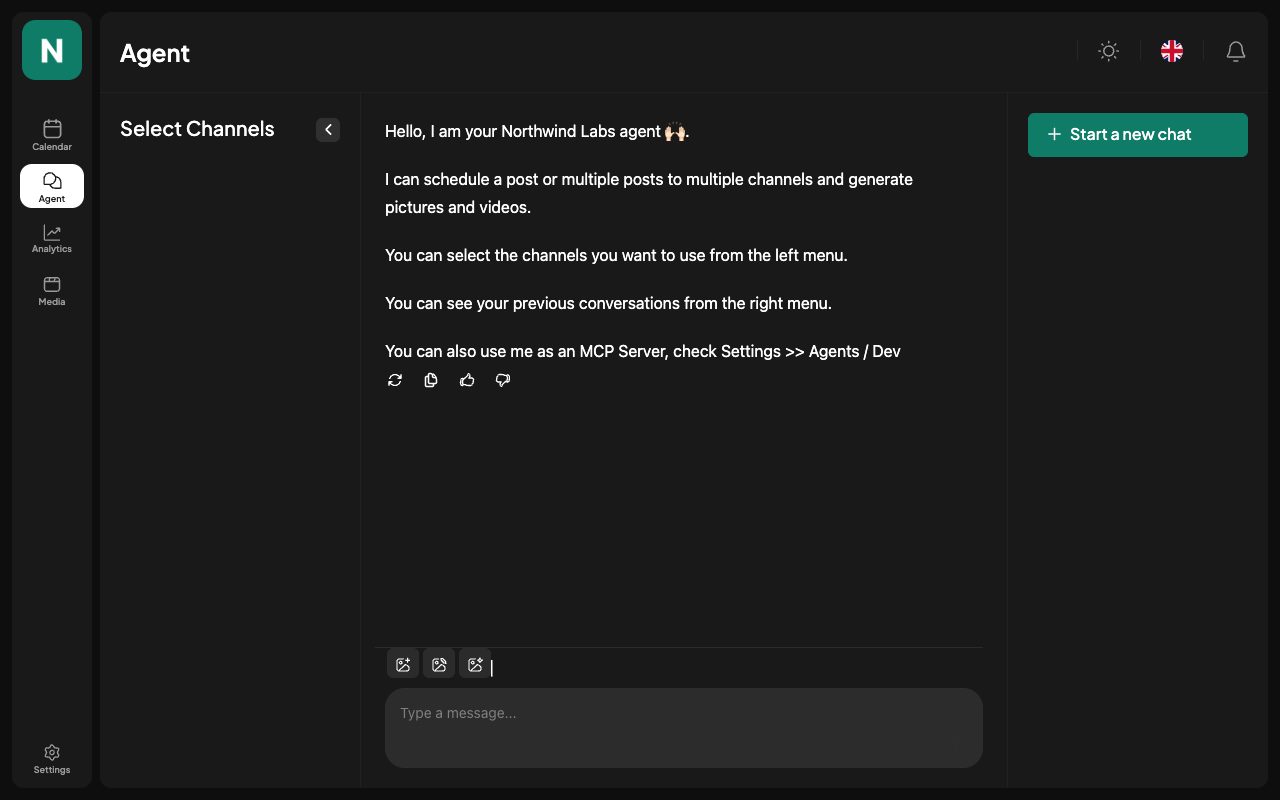
Ask the AI to write and schedule
Pick the channels on the left and tell the agent what you want. It writes the posts, makes pictures, and puts them on the calendar.
- Writes for each channel
- Makes images
- Works as an MCP server for Claude
What each post did
Reach and engagement for the connected accounts, so you can see what to post more of.
- Per channel
- Per post
- Over time
Real screens of Post Scheduler HQ. Northwind Labs is a sample brand. These screens are from a fresh copy with no accounts connected yet.
Included
Everything you get
Calendar
Day, week and month views.
25+ networks
X, LinkedIn, Instagram, TikTok and more.
AI agent
Writes and schedules posts.
Images
Made by the agent or uploaded.
Media library
Every image and video in one place.
Analytics
Reach and engagement.
Clients
Group channels by customer.
Team
Invite people to help.
Preview
See the post before it goes out.
Comments
Leave notes on a post for the team.
API and MCP
Run it from Claude or your own code.
Your brand
Your name, logo and colour.
White label
Your name on it. Your price. Your clients.
Post Scheduler HQ comes with your brand name, logo and colour on every screen your clients see. You set the price and keep what they pay you.
- Your brand name, logo and colour
- Your own login page and address
- Runs on your own server
- Sell it at any price you like
Who it's for
Made for people who sell to small businesses
Agencies
Run every client's social from one login with your name on it.
Creators
Batch a week of posts in one sitting.
Small businesses
Post to Instagram, Facebook and Google from one place.
Freelancers
Sell social media management as a monthly service.
Pricing
Free to use. No catch.
What it normally costs. Price from their own page, November 2026.
PostSyncerBufferHootsuiteMake an account with your email and use it. No card. Want help selling it? Skool members ($29/month) get the community, lessons and Yar's help.
Get your free copyJoin the Skool groupTrust
Open source underneath. Your server, your accounts.
Post Scheduler HQ is built on Postiz, an open-source social media scheduler (AGPL licence). You run your copy on your own server with your own name on it, so your accounts and posts never sit with us.
How we look after your data- Runs on your own server
- Your name, logo and colour on it
- No ads, no selling data
- Open source: read every line
A note from Yar
I run Build AI Business with Claude on Skool. Good software is often charged per person, every month. Post Scheduler HQ is a white-label copy of an open-source app: you run it on your own server with your own name on it, use it, and sell it to clients, for the one membership price.
If something's broken or missing, message me on Skool and I'll look at it.
Questions
Good to know
Something else? Message Yar on Skool.
Who can log in?
Anyone. Make a free account with your email and a password. In our paid Claude or AI video group on Skool? Pick “Skool member” and use your Skool email.
Is one login enough?
Yes. The same email and password work on every one of our products.
Where does it run?
On your own server. Sign up free here and you get the full app with your name, logo and colour on it. Claude Code can set it up for you.
What does it cost to run?
Your account is free. Running it costs your server and, if you use the agent, your AI key. Posting through each network's own developer app is free.
Why do I need developer apps?
Networks only let apps they know post for you. You make a free app on each one once and paste its keys into Post Scheduler HQ. The setup guide walks you through it.
Can I sell it to clients?
Yes. It's your copy with your name on it. It's under the AGPL licence, so it keeps a link to its source code.
Can it post at the best time?
You choose the time for each post, or let the agent suggest one.
Can I sell this to clients?
Yes. It's made for that. It's under the AGPL licence, so the app keeps a Source code link in its footer.
Plan the week in one sitting.
One calendar for X, LinkedIn, Instagram, Facebook, TikTok and YouTube. Write it, pick a time, move on.